
Scams are not a new thing, however, they are getting more and more believable. Using Facebook as a cover is an easy way to trick businesses into giving up information that they shouldn’t. Recently, one of our clients was sent an email that claimed to be from Facebook that was threatening to shut their page down. Let’s break this email down and show you how to spot a real email vs. a scam email.
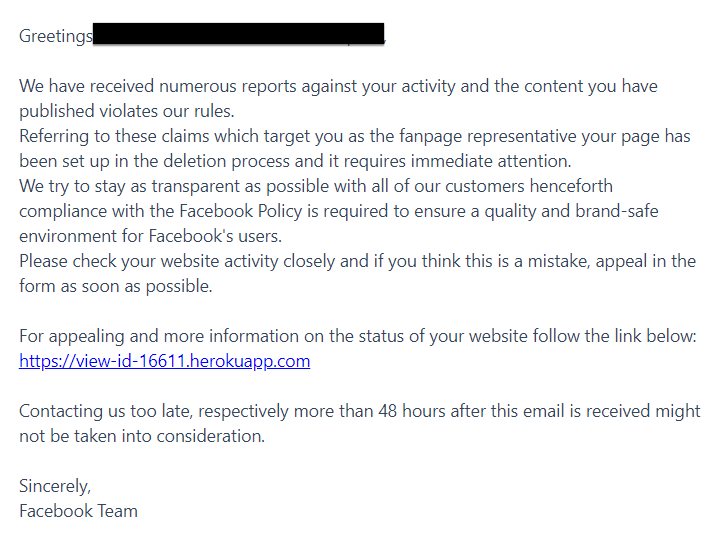
- This email was sent from: messaging-service@post.xero.com, not @facebook or @fb. This is a very obvious way to see that this email is not real. Facebook would never send an email from a 3rd party service.
- The email refers to the page as a “fanpage.” Facebook will refer to your page as your “business page.”
- The link is not a Facebook link. If you ever had an actual issue with Facebook, you would take care of that issue on Facebook, never on a different site or app.
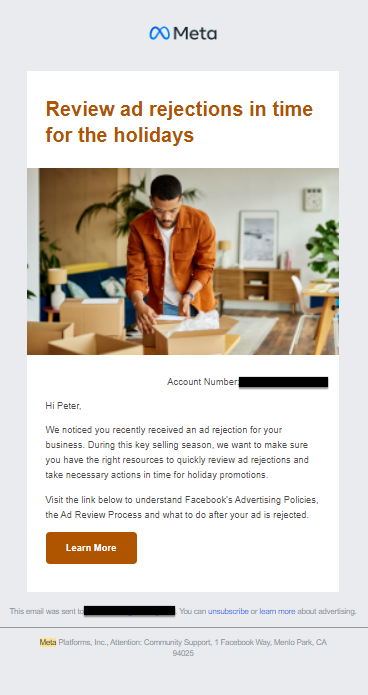
- It is using Facebook rather than Meta. In October 2021, Facebook changed its ownership name to “Meta.” If you were to get a legitimate email from Facebook, it might refer to Meta Business in some way rather than “Facebook Team.” Below is an example of a real email we received from Meta (Facebook). This email is a much more professional email that is clear that it is from the actual Facebook/Meta organization.
If you believe you have been sent an email that could be a phishing scam, do not click any links in the email. Searching on Google is an easy way to see if other businesses have received the same email. One last way to discover if an email from Facebook is legitimate is to go to your account settings > security and login > then scroll down to “See Recent Emails from Facebook.” If the email is not there, it probably isn’t real!

Have you received a phishing email recently? We’d love to hear from you so we can help other businesses avoid these scams.